PWA vs Native App: Which Should You Choose?

Last updated on July 30th, 2024 at 01:39 pm
Over the last decade, consumers have switched to using mobile as a primary device for browsing and shopping. In fact, a recent survey found one in three consumers prefer mobile shopping apps to all other channels. As a result, many fashion brands are increasingly investing in their mobile strategy.
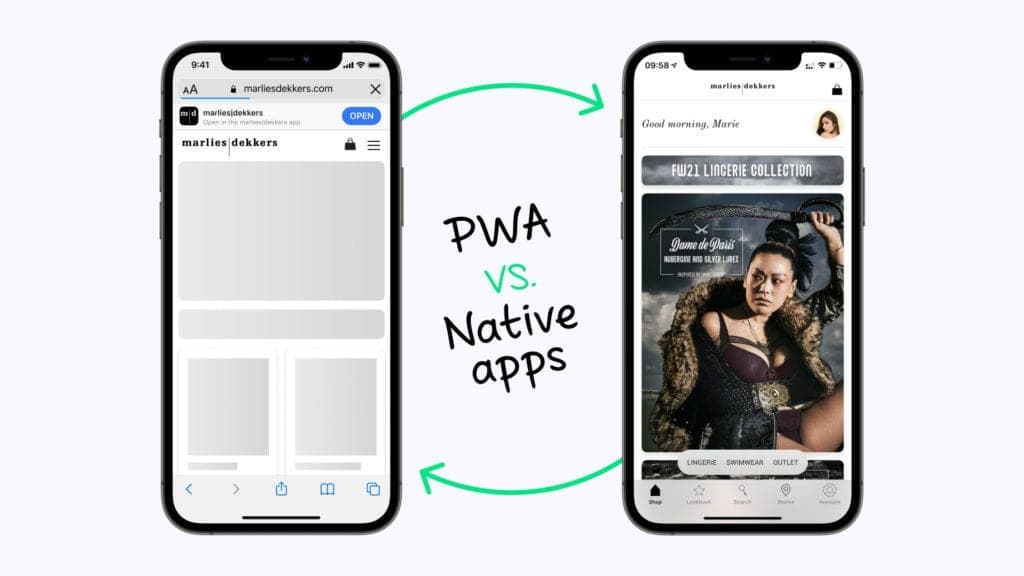
There are pros and cons to using a PWA vs native app. Both are better than a standard website, and ideally, a brand would have both, so the question is which should you invest in first?
Below, we take a detailed look at PWA vs native apps in order to answer that question.
What Is a Progressive Web App (PWA)?
Progressive web apps are websites styled to look like apps. They are written using common web technologies such as HTML, CSS, and JavaScript. Additionally, they run inside a browser or can be installed on a device.
Once installed, you can access the app from the home screen of the mobile device and open it without a browser window, creating the look and feel of a native app. Many popular websites now offer this functionality, including Twitter, Pinterest, and Uber.
Pros of PWAs
- SEO discoverability: PWAs enjoy superior SEO as their content is easily indexed by search engines, enhancing visibility and organic traffic.
- Shareable with a URL: PWAs can be shared via a simple URL, facilitating easy distribution and enabling viral marketing strategies.
- Less Expensive and Faster to Build: PWAs are cost-effective and quicker to develop due to leveraging web technologies, making them suitable for projects with budget and time constraints.
- Doesn’t require installation: PWAs eliminate the need for app store installations, reducing barriers to entry and encouraging user exploration.
- Can run on any device or OS: PWAs are platform-independent, running on any device with a modern browser, simplifying development efforts and broadening the potential user base.
- Instant, automatic updates: PWAs offer seamless updates managed on the server, ensuring users always have access to the latest version without manual intervention.
Cons of PWAs
- Limited unique functionality: PWAs may have constraints in accessing device-specific features, potentially resulting in a less comprehensive set of functionalities compared to native apps.
- Can’t interact with other apps: PWAs may lack the ability to seamlessly interact with other apps on a device, limiting integration within the broader app ecosystem.
- More battery consumption: PWAs might consume more battery compared to native apps, impacting user satisfaction, particularly on devices with power constraints.
- No push notifications for iOS devices: PWAs on iOS may face limitations in delivering push notifications, potentially affecting user engagement compared to the Android platform.
What Is a Native App?
A native app is created using a particular platform’s native coding languages. Therefore, it takes advantage of all the features of the device it runs on. The app is downloaded from the app store and then installed on the mobile device, where it can be accessed from the home screen.
Pros of native apps
- More unique features and functionality: Native apps can leverage platform-specific features, providing a broader range of functionalities and a potentially richer user experience compared to PWAs.
- Push notifications available on all devices: Native apps offer consistent and reliable push notifications across all devices, enhancing user engagement and communication.
- Geofencing capabilities: Native apps can utilize geofencing, allowing for location-based triggers and personalized experiences based on the user’s physical location.
- Better security and protection of customer data: Native apps often benefit from enhanced security measures, ensuring robust protection of sensitive customer data.
- Can interact with other apps (e.g., Camera, Payments, GPS): Native apps have comprehensive access to device features, enabling seamless integration with other apps and hardware functionalities.
- Faster load time: Native apps generally load faster than PWAs, providing a more responsive user experience, especially for resource-intensive applications.
Cons of native apps
- More expensive to build: Native app development is typically more expensive due to the need for separate codebases for different platforms and specialized expertise.
- Requires separate apps for Android and Apple devices: Native apps must be developed separately for Android and Apple devices, increasing development complexity and maintenance efforts.
- Approval from App Stores is required: Native apps undergo a review process and require approval from app stores, which can introduce delays and uncertainties in the release timeline.
PWA vs Native: What’s the Difference?
The main differences between progressive web apps and native apps are in their platform compatibility and installation methods.
PWAs, designed to operate within web browsers, offer cross-platform compatibility, enabling users to access them seamlessly across various devices. In contrast, native apps are platform-specific, requiring separate development for iOS and Android, and must be downloaded from dedicated app stores.
PWAs have a streamlined installation process, accessible directly from the web browser without the need for app store approval. Native apps, on the other hand, require approval before being published on platforms like the Apple App Store or Google Play Store.
Additionally, PWAs excel in frictionless updates, as changes are implemented server-side, ensuring users always access the latest version effortlessly. Native apps, in contrast, require manual updates through app stores, potentially leading to delayed user adoption of new features and improvements.
Overall, these distinctions impact development workflows, cost, user accessibility, and the overall user experience.
PWA | Native App | |
|---|---|---|
User Experience | Looks like a native app but less functional | Visually appealing, easy to use, highly functional |
Customizability | Less customizable | Highly customizable with unique features |
Installation | No installation required, runs on mobile device’s browser | Required (expect for mini apps like an App Clip) |
Push Notifications | Not available for iOS | Available for all devices |
Geofencing | Not available | Available |
Shareability | Can be shared with a URL | Users need to visit the app store |
Cost to Develop | Less expensive, only need one team | More expensive, need separate teams for iOS and Android |
Time to Develop | Limited time required | More time required to create and to get app store verification |
Load Time | Slower | Faster |
Battery Consumption | Uses more battery | Doesn’t consume much battery |
Security | HTTPS encryption | Improved privacy and security, two-factor authentication |
Inter-app Communication | Can’t communicate with other apps on device | Can communicate with other apps on device |
Offline Mode | Limited | Can function offline |
Updates | Does not require users to update | Requires users to update |
Native vs Progressive Web App: The Best Choice for Retail Brands
When it comes to native vs progressive web apps, for retail brands, a native app is a better initial investment. Below, we highlight why we recommend a native vs progressive web app.
Push notifications
Push notifications are an easy and seamless way to engage and communicate with customers. These real-time alerts appear on the user’s screen, enabling a brand to put vital marketing messages and updates front and center for the customer. Even if they don’t have the app open.
These notifications can be in text or video format, and using them can increase engagement with your app, boost user retention, and increase conversion rates.
But, to use this marketing technique effectively, you need a native app. PWAs can serve push notifications to Android devices, but not to iOS devices, losing a vital share of the market. A native app is the only way to engage with your entire audience using push notifications.
Better user experience
When marketing a fashion brand, visuals are absolutely key. Not only does a native app provide a significant performance increase for data-heavy visual content, but it also enables features that would be difficult or impossible on a mobile website or PWA.
For example, fully shoppable video lookbooks enable brands to showcase their products while offering customers the opportunity to make a purchase decision at any time. And because the content is preloaded, it’s available immediately. Providing similar functionality on a PWA would be technically challenging and time-consuming.
A native app also has geofencing capabilities which enable developers to set up virtual boundaries. When users step inside these boundaries, such as your physical store, the app can trigger phone actions. A location-based activated store mode allows you to make it even easier for customers to pick up orders, scan products, and interact with store associates.
Higher conversion rates
Providing customers with more communication and a better user experience leads to superior conversion rates for native apps when compared to mobile websites and PWAs. NewStore customer PME Legend experienced a 38% conversion rate lift when upgrading its old mobile website to a PWA. However, with a native app, it recorded a conversion rate 2.6x that of its PWA (a 160% increase) and 3.6x higher than its old mobile website (a 260% increase).
More secure
Native apps often benefit from robust security measures, providing a secure environment for handling sensitive customer information, such as payment details. This can contribute to building trust among users, crucial for successful retail transactions.
Showcase Your Brand with a Native Shopping App
If, like many businesses, you already have a website, but don’t have an app, your mobile strategy is missing a vital source of traffic. Your next step is to invest in a native app.
A native app will provide another entry point for new customers. Even more, it’ll give a faster and more complete experience to returning ones.
When building or deploying a native app, it is critical to have features and performance capabilities that showcase products effectively and create unique customer interactions.
Some features to consider:
- An easy-to-use video lookbook creation system, which enables brand merchandisers to upload videos and choose which products are on display.
- A catalog with products so that users can seamlessly make purchases.
- A thoroughly tested user interface designed to streamline the customer’s shopping experience.
- A system that handles security, maintenance, and updates, so you can focus on the brand.
NewStore Shopping Apps help brands radically enrich their brand experience online, in-store, and on mobile. Reach out to one of our app experts to learn how you can launch a native app in 6-8 weeks.
7 reasons why you need a consumer app.
Winning at DTC retail today means investing in an app.

Mobile POS vs. Traditional POS System: What’s Really Different?
A traditional POS system and a mobile POS system can both process a transaction. The difference is what each one allows the store to do around it. Traditiona…
Jul 28, 2026
What Is Mobile Commerce and How Does It Work?
Mobile commerce is the next wave of ecommerce. Learn more about the ways in which mobile commerce exists today, especially in retail.
Dec 16, 2024
How a Retail App Can Elevate Your Brand
Learn how a shopping app will enhance the customer experience, connect shoppers more deeply with your brand, and drive loyalty.
Aug 6, 2024